How to Write Category Pages That Rank and Convert
By Emma Pugsley, Co-founder ·

How to Write Category Pages That Rank and Convert
Short answer: a category page ranks and converts when it has a clear H1 matching what people search, a short intro that says what’s in the collection and who it’s for, filters that help shoppers narrow down fast, and internal links that send people (and Google) to the right products. Most stores have none of that. They have a title and a grid.
And that’s the problem. Your category pages probably look fine. They’re still not pulling their weight.
Why category pages matter more than you think
When someone searches “linen shirts” or “vegan leather bags”, they’re not looking for one product. They want options. That’s category intent, and product pages can’t win it. Category keywords tend to carry far more search volume than individual product terms, and one industry analysis puts category-page traffic at several times that of product pages.
Yet most SEO effort still goes into rewriting product descriptions, while the category pages sitting next to them get ignored. If you run a Shopify store, these are your collection pages, and they’re probably the most under-worked pages on your site.
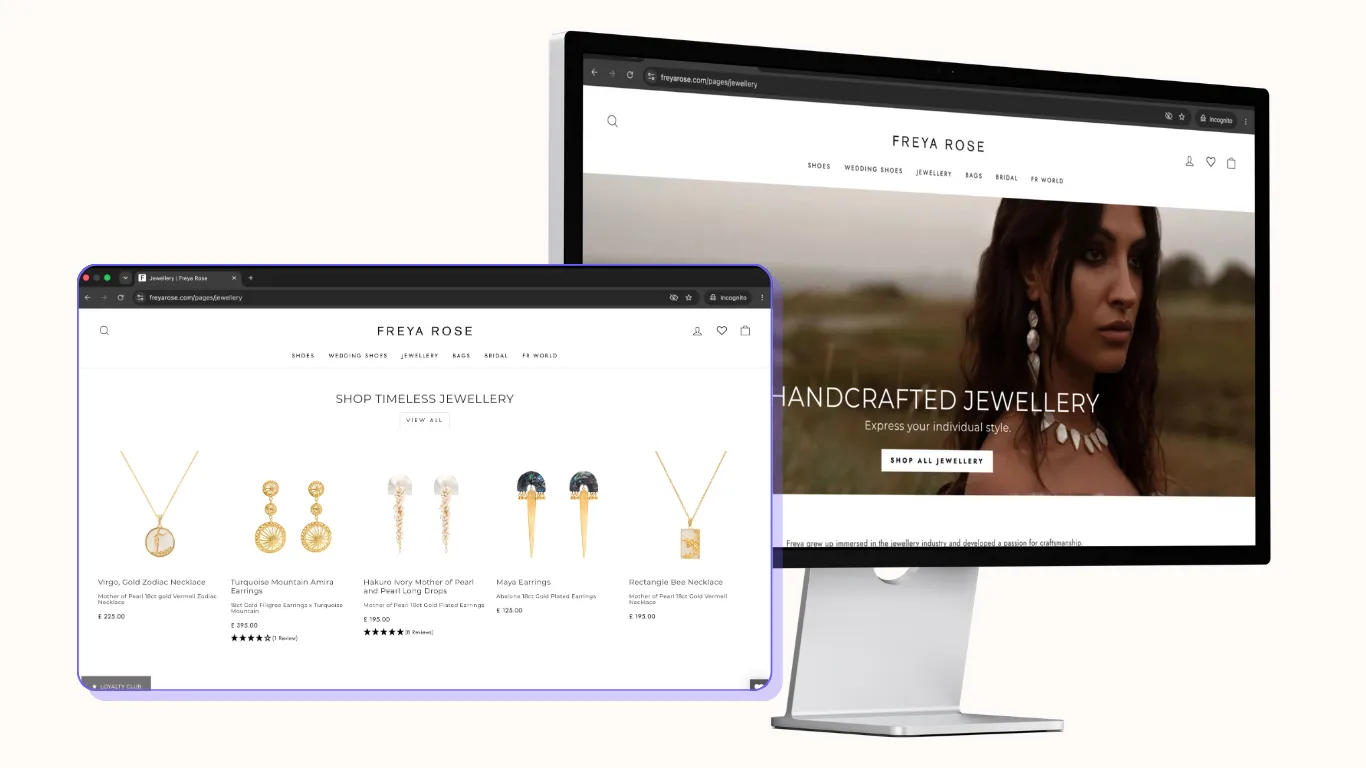
Step 1: Pick one search term per category page
Every category page should target one clear, broad shopping phrase. Research how shoppers actually describe your products, then map those terms to the right product, collection and content pages.
Practical rules:
- One primary phrase per page. “Women’s running shoes”, not “shoes, trainers, sneakers, running, women”
- Create a collection for each real way people search. If people search “gifts for gardeners”, that deserves its own collection, not a filter buried inside “Garden”
- Don’t create near-duplicate collections that compete with each other for the same phrase.
Step 2: Get the basics on the page right
The fundamentals still do most of the work:
- One H1 that includes your primary phrase. “Women’s Running Shoes”, not “Shop Now”
- A clean URL /collections/womens-running-shoes, not /collections/new-ss26-v2
- A title tag and meta description written for clicks. Your title is your ad in Google. Say what’s in the collection and why it’s worth a click: range, price point, delivery, returns
- Descriptive image alt text on the product thumbnails.
Step 3: Write intro copy that helps, not keyword filler
This is where most category pages fall down. They either have no copy at all, or 600 words of keyword soup shoved below the grid where nobody reads it.
A structure that works: a 100–150 word intro at the top with your main phrase and what the collection actually covers, then two or three short subheads breaking it into use-cases or attributes.
Write the intro for a shopper who’s just landed:
- What’s in here? (“Lightweight, breathable running shoes for road and treadmill”)
- Who’s it for? (“From first 5k to marathon training”)
- What should I know before choosing? (“Not sure about fit? Every pair ships with free returns”).
Then add a short buying-guide section or a few FAQs lower down: “How do I choose the right size?” “What’s the difference between road and trail shoes?” That’s useful for shoppers, and it gives Google (and AI search) enough context to understand and summarise the page.
Step 4: Make filters help people buy, without breaking your SEO
Filters are where ranking and converting meet.
On the conversion side, filters are one of the most useful things on the page. Shoppers who use filters view more products and convert at higher rates, and one study found shoppers who use category-level filtering and sorting convert 26% better than those who go straight to product pages. Filter by what people actually decide on: size, price, colour, use-case. Put the most-used filters first, and make them easy to tap on mobile.
On the SEO side, filters are also the number one way stores wreck their category rankings. Every filtered or sorted variation can create a new URL, and Google ends up crawling thousands of near-identical pages instead of your real ones. The fix is discipline: block crawling of filter URLs that aren’t unique, indexable pages. If a filter combination deserves to rank (“black running shoes”), turn it into a proper collection with its own copy instead.
Step 5: Sort for sales, not for the alphabet
Default sort order matters more than most owners realise. The big levers are simple: show better products first, make narrowing feel effortless, and cut the steps between “that looks good” and “it’s in my cart”.
- Lead with bestsellers or best-reviewed, not newest-first by default
- Show price, star rating and key variants (colours, sizes in stock) on the card
- Add quick-add or quick-view if your products are simple
- Hide or push down out-of-stock items. A grid of “sold out” badges is a leak.
Step 6: Link it into the rest of your site
Category pages sit in the middle of your site, so link them properly:
- Link from your main navigation and from relevant blog posts to the category
- Link from the category to your key subcategories and top products
- Add breadcrumbs so shoppers (and Google) know where they are.
A quick category page check
Open your top three collection pages on your phone and ask:
- Does the H1 match what someone would actually search?
- Is there a short, useful intro above the grid?
- Can I narrow down to what I want in two taps?
- Are the best products showing first?
- Would I click this page’s title in Google?
If you’re answering “no” to two or more, that page is costing you both rankings and sales.
The bottom line
Category pages are where search volume and buying intent overlap. Treat them as a real destination, with clear copy, smart filters and sensible sorting, and they’ll do more for your organic revenue than another round of product description rewrites.
Not sure which of your category pages are underperforming? Start a website audit. We’ll check your collection pages for SEO effectiveness, filter and crawl problems, and conversion friction, and tell you which fix to make first.